How to build a customer academy for SaaS (2026)
.jpg&w=3840&q=100)
Your CSMs are running the same onboarding session for the fifth time this month. Someone in the Support team is answering the same permissions question they answered two days ago. And at your biggest account, there’s only one person who really knows how to use your product.
These issues are exactly what a customer academy is supposed to fix. But whether it actually does comes down to how you build it.
If you’re in SaaS, you know product education is a no-brainer. In a 2024 Forrester Consulting study commissioned by Intellum, 86% of surveyed organisations reported positive returns on their customer education programmes and 96% had at least broken even.
But what the research won’t tell you is how to build a customer academy that actually improves product adoption. Most guides treat this as a content problem: pick a platform, record some courses, launch. But that only gets you a course library and a library isn’t an adoption engine.
In this guide, we’ll walk you through the seven steps, from picking the outcome you want to change, to training every user type instead of just your champion, to reinforcing what people learn so it’s still there even months after onboarding.
Key takeaways
You shouldn’t simply aim to build a course library. Instead, start from the adoption outcome you want and let that decide what you build first
End users, admins and super users need different training so design your courses accordingly
Certifying the customer’s internal champion is the best move available to you
Reinforcement after onboarding is what stops a deflected ticket coming back months later
To understand product adoption numbers, go beyond course completion and track whether customers actually understand your product
What is a customer academy for SaaS?
A customer academy is a dedicated learning environment where a SaaS company trains its external customers to use and get value from its product. It holds structured courses, guided learning paths, assessments and certifications, all under your own branding. And it’s available on demand rather than scheduled call by call.
And while there is some overlap, a customer academy is not a knowledge base. A knowledge base answers a question someone already knows how to ask. An academy, on the other hand, teaches the product workflow before your users hit a problem and then checks whether they understood it.
It also isn’t like an internal L&D programme with your logo on it. Employees typically show up to a training because their manager asked them to or it’s part of their development programme. Your customers turn up because they want something out of your product. Which also means they will leave the second your academy stops feeling relevant for that.
Want to see some examples of customer academies for inspiration? The Asana Academy, for instance, splits its tracks by role (team member, team leader, IT admin) and awards capstone certificates. And Databricks Academy runs role-based paths for engineers, analysts, architects and platform admins alongside formal certifications.
Why build a customer academy for your SaaS product?
The main reason is simple: because structured customer education can actually impact the numbers you already report on. A 2024 Forrester Consulting study commissioned by Intellum, based on a survey of 300 organisations, found respondents saw a 38.3% increase in product adoption, a 22.3% increase in retention rates and a 26.2% increase in customer satisfaction among the customers their programmes reached. Simultaneously, support costs for trained customers dropped 15.5%.
Individual programmes report the same kinds of results. Absorb built a self-serve academy for its own customers and reported a 15% reduction in support ticket volume, a 25% increase in retention and a 14% NPS gain since launching it.
It’s not hard to make the connection between these programmes and their impact. Customers who understand your product use more of it, raise fewer repeat tickets and are much harder to lose at renewal, because switching now means retraining a whole team. There’s a capacity argument too. Onboarding delivered one-to-one by CSMs only scales with headcount. A customer academy doesn’t.
How to build a customer academy for B2B SaaS in 7 steps
So, how do you actually build a customer academy? Here are the seven steps:
Start from the outcome, not the content
Segment your users by role
Design learning journeys
Build for retention from day one
Brand it and make it self-serve
Decide whether to monetise
Measure learning data
1. Start from the outcome, not the content
Pick the behaviour you want to change then work back to the training that will impact it. And make sure your outcome is specific. Not “we should educate our customers,” but something you could put on a dashboard such as: cut time-to-first-value from 40 days to 20, halve setup tickets in the first 60 days, get the share of accounts using your reporting module from 30% to 60%.
Having a specific outcome essentially tells you which courses to build first and what evidence to collect.
If you’re stuck on which outcome to choose, look at the customer data you already have. Cluster last quarter’s support tickets by topic. Ask your CSMs what every single new customer misunderstands. Check where accounts stall in your product analytics. Then pick one or two outcomes for your first academy setup.
2. Segment your SaaS users by role
Different people at your customer need different things from you so you should tailor your courses accordingly. In most B2B SaaS products there are four distinct audiences:
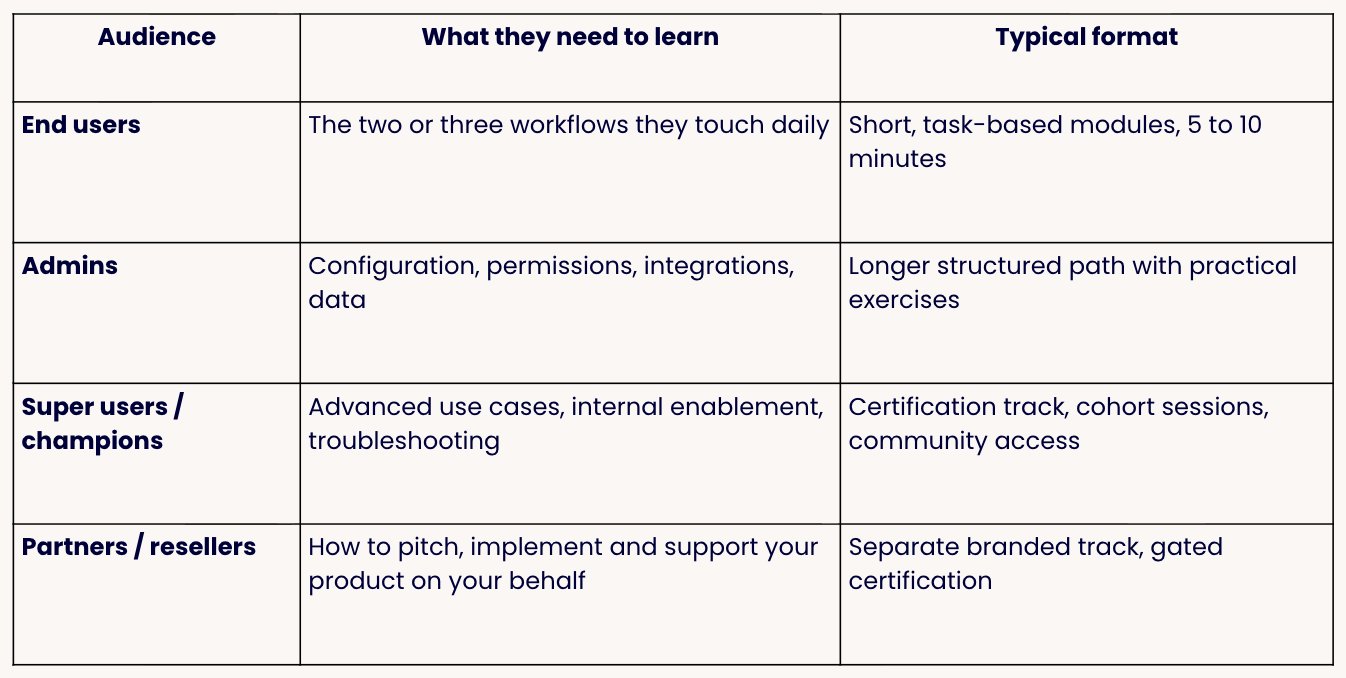
And these roles are all intertwined. Admins who never learned to configure things properly leave end users hitting walls that make it look like your product is breaking. End users who never learned the daily workflows keep usage low and low usage sinks a renewal no matter how happy the admin is. And if you skip the champion, there’s nobody keeping any of it going once your CSM moves on to the next account.
So build something for all audiences from the start, even if the first version of each is thinner. A 10-minute end-user module, a real admin path, a certification for the one or two people who will sell it internally and externally. That’s the combination that keeps an account using your product down the line and not just during onboarding week.
3. Design learning journeys (not just a course catalogue)
A learning journey is a sequenced path through your content where the next course your learner sees next depends on their role, their answers and their progress. A course catalogue, on the other hand, is simply a page with 30 videos on it and no indication about which matter most to the person looking at it.
That sequencing is the difference between a customer who actually completes your product onboarding and one who simply opens the academy once, feels overwhelmed and books a call instead.
To build a learning journey, you’ll need a defined entry point per role, content released in stages rather than all at once and a knowledge check between stages so nobody can just coast through.
4. Build for retention from day one
If you only teach someone something once, most of it is gone within weeks. That’s why the ticket you deflected during the onboarding week comes back two months later.
Reinforcement usually looks like short recurring knowledge checks after a module completes, refresher content triggered by something in the account’s lifecycle, and recertification on a cadence for admins and certified champions. And tools like MemoTrainer take the scheduling off your hands by automatically showing each learner more of what they struggled with and less of what they’ve already understood.
The important thing is you should design this from the start so that you help your learners retain relevant product information from day one.
5. Brand it and make it self-serve at scale
Your academy should look like your product, be hosted on your domain and be reachable without anyone needing to file a request.
Self-serve at scale also ideally means two things:
Single sign-on, so learners aren’t managing a second password
Self-enrolment so nobody’s waiting on your team to set up an account
This gives your learners access at the point of need and not just from a welcome email you sent on day one that they will quickly archive and forget.
If you serve customers who need their own separate environments (e.g., enterprise accounts training their own teams or partners reselling your product), you’ll also want multi-tenant branding: the same underlying content presented in each organisation’s own look and feel, with learner data kept separate. That’s standard in platforms built for external audiences (like aNewSpring 😉) but a common gap in LMS platforms built for employees.
6. Decide whether to monetise
This is important to settle before you build because it changes both your content standards and your platform shortlist.
Free is the default for onboarding and core-workflow training. If the goal is product adoption, a paywall will work against you.
Paid certification is the common hybrid. Keep the learning free but then charge for the exam, the credential or an instructor-led track. It works well where a certification adds credibility on a CV and it partially funds your programme without gating adoption.
A paid academy as a revenue line makes sense where the training has standalone value beyond your product, usually in regulated industries or where you're teaching a methodology rather than a tool. For this option, you’ll need e-commerce features available from the start.
Most teams should start free, prove their impact and then only add paid certification if there’s real demand.
7. Measure the learning data
If you’ve set an objective from the start, you’ll know exactly what metrics you’ll need to track to monitor the performance of your customer academy. At the very least you should be looking at assessment scores before and after each module, retention check scores a few weeks later, and a way to connect both to product usage per account.
Also make sure to write down where you’re starting from: current ticket volume by category, current time-to-value, current adoption for the feature you’re targeting. This will give you a baseline against which you can compare once you’ve launched your customer academy.
How to measure customer academy success in SaaS
When you think about what metrics you’ll be tracking, it’s important to take a look at both learning outcomes and business outcomes together. Course completions with no product adoption numbers mean your content isn’t teaching the right things. And, simultaneously, adoption improvements with no learning data mean you can’t actually show your academy caused them.
Here are the main metrics you should track:
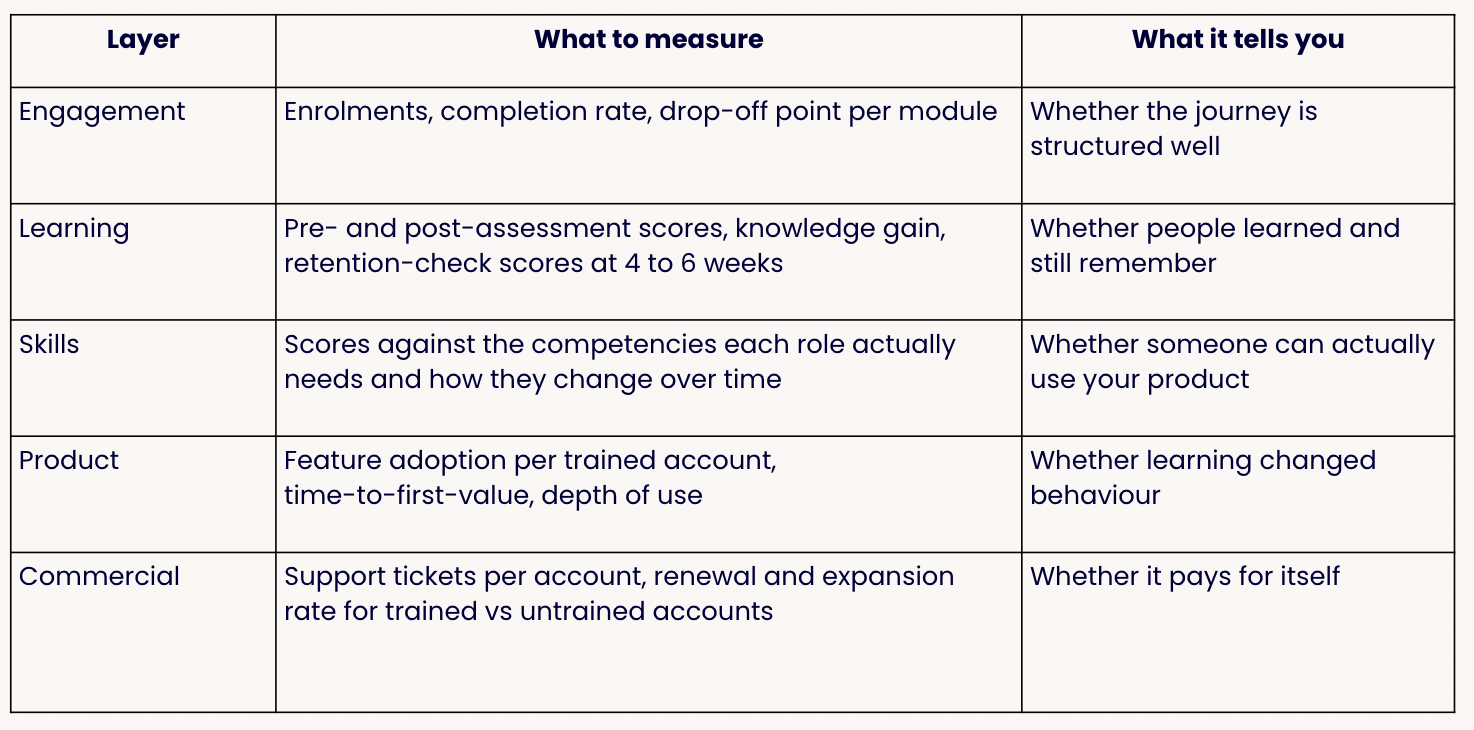
Most academies stop at the learning layer, but the skills data is what closes the loop. Rather than asking whether someone passed a module, you score them against the competencies their role in your product genuinely needs, then watch that score change. For a CS team this is the most useful number on this list, because “this account has two admins assessed at the level the job needs” tells you more about the renewal opportunity than any completion rate will.
One more thing: segment every report by trained versus untrained accounts. This will help you compare the two groups and actually strengthen your business case for your customer academy.
For a wider view of the metrics worth tracking, see our guide to the 15 metrics behind a successful learning strategy and pair the numbers with structured training feedback from learners.
Build vs. buy: How to choose a customer academy platform for SaaS
Sooner or later someone will ask you why you don’t just build this into your own product. But the short answer is: it’s smarter to buy a platform unless customer education is the thing you sell.
Building it properly means building authoring, sequencing, assessment, certification, branding, reporting and access management, then owning all of it forever. You can absolutely do it. You’ll just be maintaining a small LMS instead of shipping your actual product roadmap.
Embedding lightweight content in your own app is a different thing and worth doing. Tooltips and in-product guidance catch the question at the moment someone has it, which no academy can match. But they won’t give you journeys, certification, or any record of what a customer actually learned. So, deploy both.
And if you’re buying, here’s the criteria that matter:
Can people outside your company get in without you doing admin? Self-enrolment and SSO, no per-seat setup. If your CS team has to provision accounts, the academy becomes another task on their to-do list.
Does it reinforce anything or only record completions? Without reinforcement your deflection numbers decay over time.
Can each customer or partner have their own branded environment, with their data kept separate? Only relevant if you sell to enterprises or through a channel, and painful to bolt on later.
Can you join learning data to account health? Think metrics like assessment and knowledge-gain scores per account – not just a completion percentage.
And, of course, add monetisation and live-session handling if you’re charging for training or running cohort onboarding.
Before you sit through the demos note that most platforms in this market were built for employee training and adapted for external audiences afterwards. That’s where the friction with SSO, branding and per-account reporting comes from.
aNewSpring (that's us! 👋) was built the other way round: around learning journeys and knowledge retention for external learners. Separate branded environments per organisation, our MemoTrainer handling the spaced reinforcement, blended delivery in the same place as your self-paced content, and a catalogue if you charge.
Want to see what that could look like for your customer academy? Book a demo and we'll walk you through how the journeys and the reinforcement fit together.
Frequently asked questions
What is a customer academy?
A customer academy is a branded, structured training environment where a company teaches its customers how to use its product. It holds sequenced learning paths, assessments and certifications, and it's available on demand rather than delivered call by call. In B2B SaaS it's usually owned by customer success or customer education, and it's judged on product adoption, support ticket volume and retention rather than on training completions.
How do you build a customer training academy?
Start with the adoption outcome you want to change, not with a content list. Then segment your learners by role (end users, admins, super users), design a sequenced learning journey for each, and add reinforcement so knowledge survives past onboarding. Brand it and make it self-serve with SSO and self-enrolment, decide upfront whether any part of it is paid, and instrument it to capture assessment and retention data alongside product usage. Launch with one or two high-value journeys rather than a full catalogue, then expand from a template.
How much does a customer academy cost?
Cost comes in three parts: platform, content production and internal time. Platform pricing runs from per-learner subscriptions to quote-only enterprise contracts, and plenty of vendors in this category publish no pricing at all. aNewSpring publishes per-learner rates that scale down with volume. Content is usually the bigger line item, though it drops sharply after the first journey if you've built reusable templates. Budget internal time for a subject-matter expert too, because the content has to come from someone who knows the product.